
Short answer: Game in Picture can pause supported single-player or offline PC games from its overlay, including titles whose own menu does not stop the action. Auto-pause is stored per game and can do it for you every time you leave fullscreen. Test a game once in a quiet moment, keep it to offline play, and Alt+Tab stops being the risky part.
Why Escape is not always a pause
Single-player games handle interruptions in very different ways. Soulslike titles are the well-known case: opening the inventory, swapping equipment or checking the map can leave the world running, because tension is part of the design. Survival games, immersive sims and plenty of action RPGs do the same thing in quieter ways, with timers, hunger, scripted patrols or a boss that keeps swinging.
Even when a game does pause properly, the pause is buried behind a menu, a confirmation and a fade. That is fine when you plan the break. It is not fine when the doorbell goes, a call comes in, a work message arrives or a child needs you now.
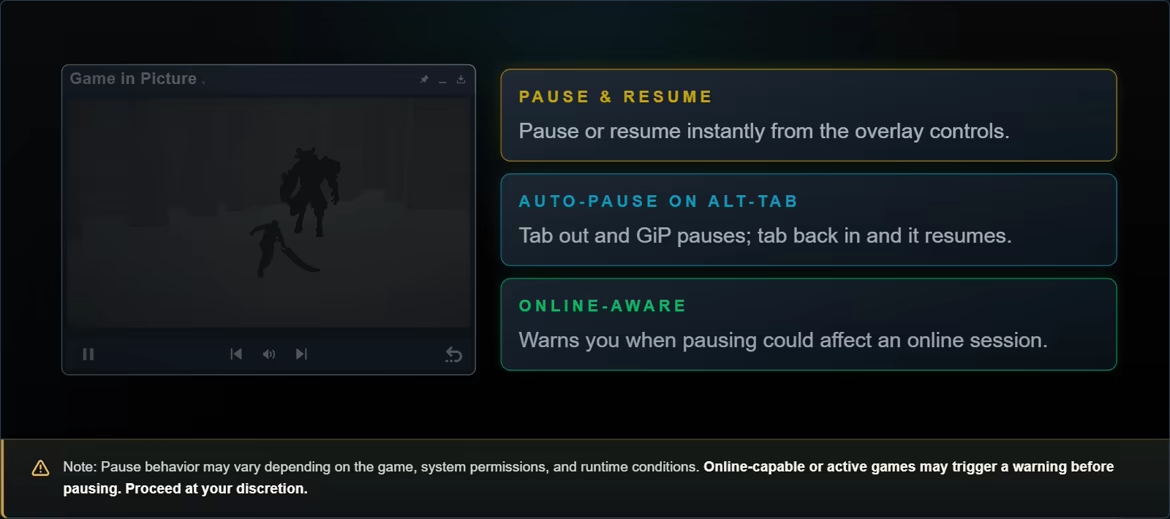
A pause utility works differently from an in-game menu. Instead of asking the game to open a pause screen, it temporarily suspends a supported process and resumes it later. The action is the same in every game that supports it, and Game in Picture keeps it next to the live view of the game in its overlay, so you can still see exactly where you left off.
Test a new game once, in a quiet moment
-
Start in an offline or single-player session. Use the game's offline mode where it has one. Leave co-op, PvP and other live sessions out of it.
-
Let Game in Picture track the game. Launch GiP, enter the game and Alt+Tab once. The game should appear in the live overlay. Manual Selection is available if you need to choose the window yourself.
-
Pick a safe spot. Test near a checkpoint or save, away from enemies, unsaved dialogue, loading transitions and timed events.
-
Pause from the overlay. Use GiP's pause control, wait a moment and confirm that animation and gameplay have stopped. Resume and check that input, audio and saving still behave normally.
-
Turn on auto-pause once the test works. Auto-pause is stored per game. Once enabled, GiP can pause when you leave fullscreen and resume when you return, so the rest of your sessions need no thought at all.
Alt+Tab without leaving the run exposed
Manual pause suits rare, deliberate breaks. Auto-pause is for the sessions where you move between the game and everything else constantly. Switch away and the tracked game stops; come back and it picks up. Because the setting is per game, a title you have tested behaves that way while everything else is left alone.
- A phone call, a delivery or a doorbell in the middle of a fight
- Parents and caregivers who may need to step away without warning
- A work message on a single-monitor setup, where every Alt+Tab hides the game
- Looking up a build, a map or a quest step without leaving the run running
- Fatigue, mobility or attention-related needs that make long unbroken sessions hard
The live view matters as much as the pause here. A minimised game tells you nothing; a paused game in the corner of the overlay shows the frame you stopped on, so you can pick the moment to go back.
What about Elden Ring, Dark Souls and other named games?
Those titles describe the problem clearly and they are what most people search for, but no utility can publish a permanent compatibility list. Game updates, anti-cheat, online state and runtime conditions change how any individual game behaves, and that is as true of a decade-old RPG as of last week's release.
Check a title with a quick offline test on its current build. GiP provides the pause workflow and the online check; it does not promise support for every game, in every genre, on every patch.
What pausing does, and does not, do
GiP does not add an in-game menu and does not touch save data. It temporarily suspends a supported process, so the game stops exactly where it stands: you cannot browse your inventory while it is paused, and a pause is not a substitute for saving before you close anything.